
How to Use the Job Search Platform
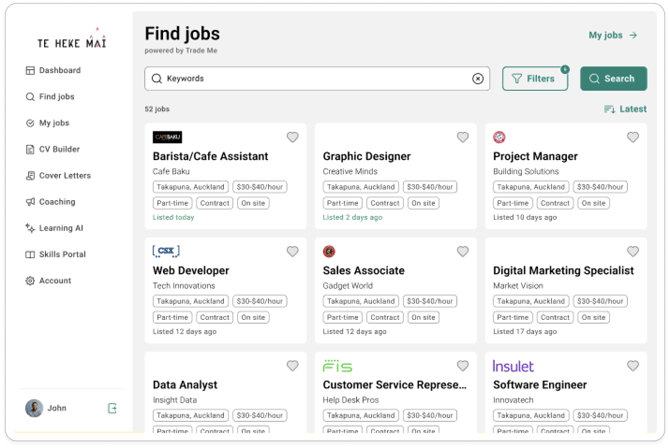
Accessing 'Find Jobs:
- Desktop/Laptop View: Left-hand side Navigation Bar→ Find Jobs
Use the filters and search tools to find roles that suit your preferences:
- Job Type: Full-time, Part-time, Contract
- Pay Range: Annual or Hourly (set minimum and maximum amounts)
- Location: Choose your preferred region
- Category: Select the industry or job category
- Sort by: Job title or listing date
Viewing Role Details
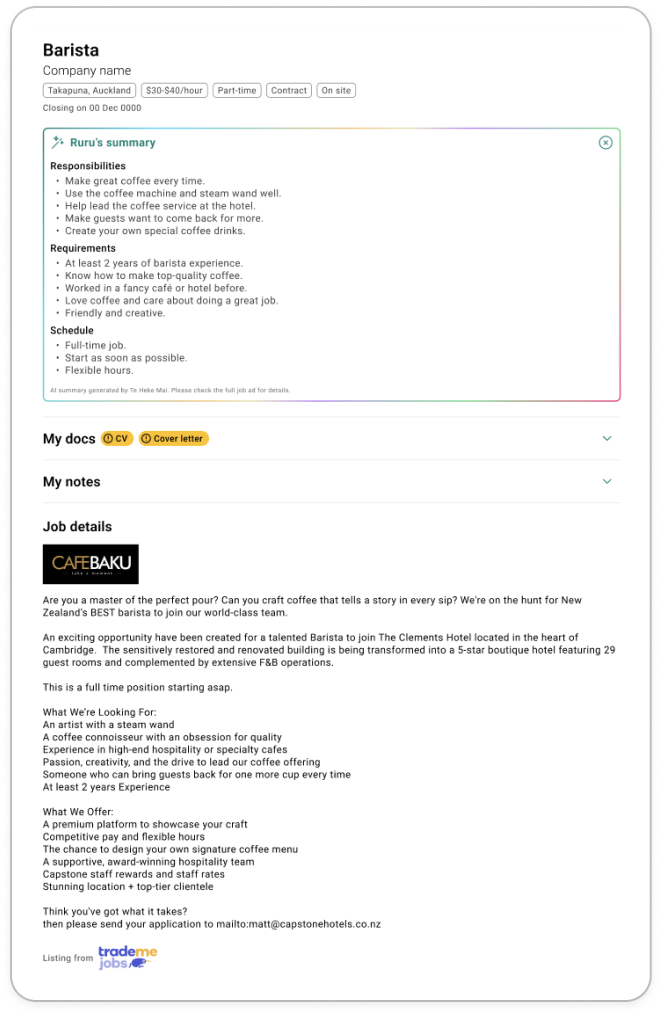
Each job listing includes:
- Job Details: As provided directly from Trade Me Jobs
- Ruru’s Summary: An AI-generated summary by Te Heke Mai that highlights key responsibilities, requirements, and other important details of the role
Personalising Your Job Search
-
My Docs: Upload your THM CV and Cover Letter that you would use when applying for the role. (Select 'External CV/CL' if you are not using one from THM)
Note: Uploading documents here does not mean you are applying. These are stored for your convenience when you're ready to apply. Read more on 'Applying for roles'.
-
My Notes: Add personal notes about the job. These are private and only visible to you.
When you add documents or notes to a job, that job moves to your 'My Jobs' list for easy access later. If you change your mind, you can manually remove it from your 'My Jobs' at any time.
Additional Features
- Learn more about:
- Saving & managing jobs
- Applying to jobs